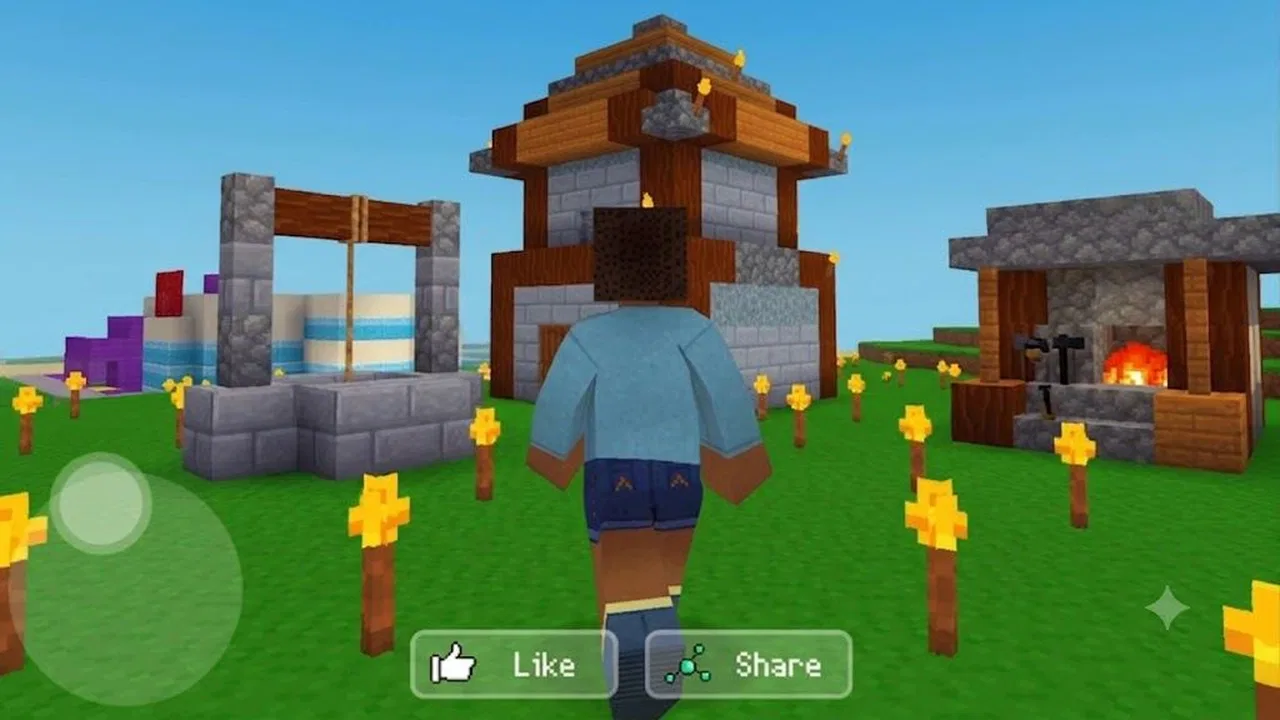
Robot Craft Sandbox
- 3.4
- Rating
- 500.00K
- Installs
- Free
- Price

 Analysis by App-foxy
I approached Robot Craft Sandbox as a casual building game rather than a traditional mission-driven adventure. Its central appeal is easy to understand: you create, craft, and move through a futuristic robot setting where experimentation matters more than following a fixed story. After spending time with it, my impression is that it works best when I treat the world as a personal project instead of expecting a tightly directed campaign.
That distinction matters. This is a simulation game from TapTap Lab, and the free entry point makes it simple to try without committing money. The store lists it for Everyone, so it is positioned as a broad, accessible experience rather than a title aimed at mature players. Its Android requirement is version 7.0 or later, which keeps the technical barrier fairly modest for compatible devices.
The public response is more mixed than the large install figure might suggest. It has passed half a million installs, while its average sits at 3.4 from roughly six hundred ratings. I read that combination as a reason to approach it with curiosity but not blind enthusiasm: enough people have tried it to establish interest, yet the score suggests that the experience will not satisfy every player equally.
You May Also Like

 Pandora - Music & Podcasts
Pandora’s Music Is Easy to Start, but Harder to Recover
Pandora’s strength is its low-effort path from a seed to a station. Its weak spot is how much confidence it asks you to place in connection, setup, and quiet recovery.

 8 Ball Pool
8 Ball Pool Is Built on Rivalries, Rematches, and Routine
A close look at the rivalries, rematches, shared routines, and unanswered safety questions that turn a quick pool match into a persistent mobile community.

 Samsung Music
Samsung Music’s Quiet Strength Is Playing What You Already Own
Its reach comes less from spectacle than from dependable access to a personal library. That simplicity is both the app’s strongest retention engine and its ceiling.

 AccuWeather: Weather Radar
AccuWeather Review: A Quick, Clear Forecast for Everyday Decisions
For everyday plans, the best forecast is the one you can understand quickly. AccuWeather makes rain timing, radar, and local conditions easy to act on, with a few trade-offs.

 Hill Climb Racing
Why Hill Climb Racing Still Turns Crashes Into One More Run
A tiny car, a bumpy hill and one more upgrade: Hill Climb Racing keeps resurfacing because its simple chaos makes every near-miss feel personal.

 AliExpress - Shopping App
AliExpress Makes Global Shopping Feel Personal, but Shoppers Bear the Risk
AliExpress turns a global marketplace into a pocket-sized discovery engine. Its reach is useful, its shopping loop compelling, and its trade-offs easy to miss.
More From Our News Desk
View All News


How the free model affects the value
The most important cost detail is straightforward: Robot Craft Sandbox is free to access. That changes how I judge it. I do not expect the same depth, polish, or carefully paced progression that I would demand from a premium simulation game. Instead, I ask whether the opening experience gives me enough room to experiment and whether the free format makes trying different building ideas worthwhile.
For someone deciding whether to install it, the free price is a genuine advantage because there is no purchase decision to make before seeing how the robot world feels on a particular phone. It is especially useful for families or younger players who want a creative game to test casually. The Everyone age rating also makes it easier to consider for a shared device, although I would still check the way a child uses any game and whether the device handles it comfortably.
I would not describe free access as proof of unlimited value. A game can cost nothing and still waste time if its controls are awkward or its creative tools feel shallow. Here, the value depends heavily on whether you enjoy making your own objectives. If you need a clear chain of missions that constantly tells you what to do next, the absence of that kind of direction can make the free download feel less rewarding.
The current version shown for the game is 4.0.1.02. That is useful when checking compatibility or discussing the title with another player, but I would not use a version number alone as evidence that every device will perform identically. Android hardware varies widely, and a robot-filled sandbox can feel very different on a newer phone than on an older model that technically meets the operating-system requirement.
What I actually get from the sandbox format
The strongest part of the experience is the freedom to turn construction into the main activity. Rather than treating crafting as a small side feature between battles, I see it as the reason to return. I can begin with a simple idea, adjust it after seeing how it looks in the world, and then use exploration to decide what I want to build next. That loop is more satisfying when I allow myself to experiment instead of trying to finish everything immediately.
A useful way to play is to give each session a small purpose. I might spend one short session planning a compact robot-themed base, another testing how the surrounding environment looks from it, and a later session refining the layout. This prevents the open-ended structure from becoming aimless. It also makes the game suitable for brief play periods, because I can stop after completing a small construction goal rather than waiting for a chapter to end.
One non-obvious strength of this approach is that mistakes can become part of the design process. In a conventional level-based game, an inefficient choice may simply mean failure. In a sandbox, an awkward structure can become a landmark, a temporary workshop, or the starting point for a better idea. I recommend building rough versions first and polishing only after the overall shape feels right. That saves time and reduces the frustration of trying to make the first attempt perfect.
The futuristic robot setting also gives the creative work a clearer identity than a completely blank building space. Even without relying on a scripted narrative, the theme encourages certain projects: mechanical-looking shelters, industrial areas, observation points, or a compact settlement that feels designed for machines. I found that a strong theme helps when the game does not constantly provide objectives, because it gives my imagination somewhere to start.
Three practical ways to get more from it
My first tip is to establish a central work area before spreading out. In an open construction game, moving between scattered projects can make the world feel disorganized and can weaken the sense of progress. A compact base gives me a visual reference point and makes later expansion feel intentional. I would leave open space around it rather than filling every available area immediately, because unfinished room is useful when a new idea appears.
My second tip is to separate functional builds from decorative builds. A working area should be easy to understand, while a decorative area can be more experimental. Mixing both from the beginning may look attractive, but it can also make revisions harder. Keeping the first layout simple lets me learn the game’s building rhythm without committing my best design ideas too early.
My third tip is to use exploration as research rather than as a distraction from crafting. When I find an interesting location or visual detail, I can bring that inspiration back to my own project. This makes the two sides of the game support each other: exploring gives me ideas, and building gives exploration a purpose. Players who only wander may eventually feel directionless, while players who only construct may miss the setting’s sense of discovery.
These are not shortcuts that remove the need to learn the game. They are habits that make an open-ended title easier to manage. The important trade-off is that Robot Craft Sandbox asks me to supply some of the structure that a more traditional simulation would provide automatically.
Where the experience can become frustrating
The same freedom that attracts creative players can be a weakness for anyone looking for a strong progression system. I do not approach this as a carefully scripted adventure with a guaranteed sequence of memorable moments. Its appeal is closer to a digital workshop: I decide what deserves attention, and the satisfaction comes from seeing an idea take shape. If that sounds like work rather than play, this may not be the right simulation for you.
Another limitation is the uncertainty that comes with playing on different Android devices. The minimum operating-system requirement is accessible, but compatibility on paper does not tell me how smooth the experience will feel, how comfortable the controls will be, or how well a particular screen suits detailed construction. I would be cautious about judging the game after a very short session on an older phone, but I would also avoid assuming that meeting the requirement guarantees an ideal experience.
The mixed average rating reinforces that caution. A 3.4 average is not a disaster, but it is not a strong signal of universal satisfaction either. For me, it suggests that the title’s value is highly dependent on personal taste and expectations. Players who enjoy self-directed building may find more to appreciate than players who install it expecting a polished, linear robot adventure.
I also see a potential attention problem in the sandbox structure. Without a personal plan, I can spend time placing objects without feeling that I have achieved anything meaningful. My solution is to define a visible result before starting: a small base, a themed district, a route through the environment, or a finished area that can be revisited later. That turns freeform play into a series of manageable projects.
Compared with a traditional city-building simulation, this game feels more personal and hands-on because the focus is on crafting and exploring a robot world rather than managing a complex population or economy. Compared with a block-building game, its futuristic robot identity gives the setting a more specific personality, but it may not provide the same appeal to players who want an enormous, highly established creative ecosystem. Compared with an adventure game, it offers less reason to follow a predetermined path and more reason to invent one.
That comparison helps clarify the audience. I would choose a conventional city simulator for detailed management decisions, a broad block-building alternative for a larger established creative community, and a story-led adventure for dramatic pacing. I would choose this title when I want a lighter, theme-driven construction space that I can approach on my own terms.
Who is most likely to enjoy it?
Robot Craft Sandbox is a good match for players who like turning a blank space into something recognizable. It can work for someone who enjoys decorating, planning small environments, or imagining how a robot settlement might function. It is also a reasonable choice for a casual player who wants to try a free simulation without first paying for a premium release.
I can imagine a realistic everyday use case after school or during a short break: open the game, choose one small construction task, explore nearby for inspiration, and stop once that task is complete. The game does not need to become an all-evening commitment to be worthwhile. In fact, treating it as a series of short creative sessions may make its open format more enjoyable.
It may also suit families who want a game that can be discussed together. One person can suggest the purpose of a building, another can focus on its appearance, and a third can explore for ideas. The Everyone rating supports that broad positioning, although individual preferences still matter. A child who wants constant action may lose interest, while a child who enjoys arranging and inventing may return to the same world repeatedly.
I would recommend skipping it if your main priority is competitive play, a deep narrative, or a carefully measured management system. I would also hesitate to recommend it to anyone who dislikes repeating small construction adjustments. Sandbox creativity often involves rebuilding, comparing, and changing direction. If you want every minute to deliver a clear reward or story development, another category of game will likely be a better use of your time.
My verdict after weighing the trade-offs
My final view is positive but specific: Robot Craft Sandbox is worth trying because it is free, accessible to a wide age range, and built around a robot-themed creative loop that can be shaped into personal projects. I especially like it when I approach it as a relaxed workshop rather than a conventional adventure. The ability to build, craft, and explore gives the game a useful balance between making something and finding inspiration for the next project.
Its weaknesses are just as important. The open structure can feel empty without self-imposed goals, the mixed rating suggests that the execution will not suit everyone, and device experience may vary even among compatible Android phones. The game is not my first choice for players seeking a deep city-management simulation or a story with firm direction.
My recommendation is to install it when you want a no-cost creative experiment, not when you need a complete, tightly guided adventure. Start with a small base, keep functional and decorative areas separate, and use exploration to feed your construction ideas. If that rhythm feels satisfying, the free price gives you room to continue discovering your own projects. If it feels like you are doing all the work to create the fun, you will probably be happier with a more structured alternative.
FAQs for Robot Craft Sandbox
01What is Robot Craft Sandbox?
Robot Craft Sandbox is a creative building and simulation game centered on designing, customizing, and testing robots in an open-ended sandbox environment. Players can experiment with different parts, assemble machines, explore interactive areas, and see how their creations perform. It is aimed at users who enjoy construction, physics-based experimentation, and free-form gameplay rather than a strictly linear story.
02How does the gameplay work in Robot Craft Sandbox?
The main gameplay loop involves collecting or selecting robot components, assembling a machine, adjusting its design, and testing it in the available sandbox environment. You can try different combinations of bodies, tools, movement parts, and other mechanical elements to create robots with different abilities. The experience encourages experimentation, so there may be several ways to complete challenges or simply build something unusual.
03Is Robot Craft Sandbox suitable for children?
Robot Craft Sandbox can be appealing to children and younger players because it focuses on construction, creativity, and experimentation. However, parents should review the game’s age rating, advertisements, in-app purchase options, and online features before allowing unsupervised play. Depending on the version and device, some content or interactions may require additional supervision, especially when purchases or external links are available.
04Does Robot Craft Sandbox require an internet connection?
The basic building and sandbox features may work without a constant internet connection, but the exact offline functionality can depend on the platform and version installed. Internet access may still be needed for the initial download, updates, advertisements, cloud-related features, or online content. If you plan to play while traveling, it is best to test the game offline after installation rather than assuming every feature will remain available.
05Are there advertisements or in-app purchases in Robot Craft Sandbox?
The availability of advertisements and in-app purchases can vary according to the mobile version, region, and distribution platform. Before downloading, check the official store listing for pricing and purchase information. Ads may appear during menus or gameplay, while optional purchases could provide extra items, customization choices, or convenience features. Using device parental controls is recommended if children will be playing the game.
Pros
- Creative sandbox lets you build and customize unique robots.
- Physics-based gameplay makes testing machines entertaining and unpredictable.
- Simple controls are accessible for younger and casual players.
- Open-ended challenges encourage experimentation and problem-solving.
- Offline play is convenient when you have no internet connection.
Cons
- Some building options may require significant time to unlock.
- Controls can feel imprecise when placing small parts.
- The physics occasionally produce glitches or unexpected behavior.
- Visuals are functional but may look dated on newer devices.
- Gameplay can become repetitive after exploring the main sandbox tools.

Robot Craft Sandbox
Gallery